Ansible
Ansible SSH Keys to managed nodes
코딩+아빠
2023. 6. 28. 22:45
/etc/ansible/hosts에 아래와 같은 Inventory가 설정되어 있다는 가정
패스워드를 통한 접근방법
web1 ansible_host=172.20.1.100 ansible_ssh_pass=Passw0rd
web2 ansible_host=172.20.1.101 ansible_ssh_pass=Passw0rd
ssh 생성
ssh-keygen -t rsa -f ~/.ssh/ansible

-f : 파일명/저장경로 지정
-t : 암호화 옵션
대상 host에서 PasswordAuthentication 설정하기
sudo vi /etc/ssh/sshd_config

PasswordAuthentication yes

sudo systemctl restart sshd
ssh 생성 후 전달
ssh-copy-id -i id_ras.pub user1@server1
ssh-copy-id -i /home/thor/.ssh/ansible ansible.pub@web1
ssh키를 사용한 접근 방법
web1 ansible_host=172.20.1.100 ansible_user=user1 ansible_ssh_private_key_file=/~path/private.key
web2 ansible_host=172.20.1.101 ansible_user=user1 ansible_ssh_private_key_file=~/.ssh/ansible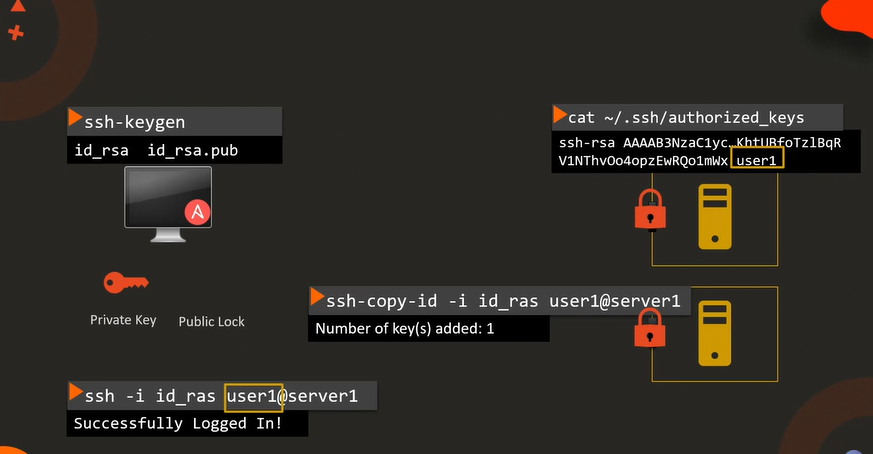
반응형